
Social Preview Architect
Make every shared link to your site look great everywhere: strategy first, on-brand, technically correct.
SKILL.md in the open agentskills.io standard, works directly in Claude, ChatGPT/Codex, Cursor, Copilot & more.
Social Preview Architect is an AI skill for Open Graph and social-share previews that plans, designs, checks and maintains the images and meta tags your website shows when links are shared on Discord, Slack, LinkedIn, WhatsApp, X and beyond. It never generates blindly: it first inspects the real page (logo, colors, theme, existing og: tags), then proposes a preview strategy for approval.
What this skill does
- Analyzes the real website: existing og:/twitter: tags, logo, favicon, brand colors, typography, default theme
- Presents a manifest with strategy, image count and templates for approval before creating anything (never generates blindly)
- Designs preview cards asset-first from your real brand at the universal standard 1200×630 (1.91:1)
- Delivers per your AI runtime: a finished image, SVG, HTML/CSS, Next.js/Satori code, a spec or an image prompt
- Checks every card for readability (300 to 1200 px), contrast, safe area, brand fit and factual accuracy
- Writes the matching meta tags + wiring for your stack (Next.js, Astro, Nuxt, SvelteKit, WordPress, Hugo …)
- Offers review, maintenance and repair modes (cache/tag mismatch) + a Social Preview Profile
Description
Social Preview Architect is a skill for social previews (link previews): it makes sure every public page of your site renders correctly, on-brand, legibly and convincingly across platforms the moment its link is shared. Guiding idea: a social preview is part of the site's design system, not a stray marketing graphic. So it doesn't jump straight to images: it first analyzes the real page (existing og:/twitter: tags, logo, favicon, brand colors, typography, default theme), distills a Brand DNA, and presents a manifest with a recommended strategy, image count and templates for your approval. Only then does it design asset-first from your real brand, at the robust universal standard 1200×630 (1.91:1), and adapts to the AI runtime: a finished image where it can render one, otherwise SVG, HTML/CSS, Next.js opengraph-image.tsx/Satori code, a precise spec or an image prompt. Every card runs through a QA loop (readability at 1200/600/400/300 px, contrast, safe area, brand fit, factual accuracy) and gets the matching meta tags plus wiring for your stack (Next.js, Astro, Nuxt, SvelteKit, WordPress, Hugo …). Add a review mode (audit existing previews, no new images), a maintenance mode (new pages without an image, orphaned images, changed logos, broken URLs, cache) and a saveable Social Preview Profile for lasting consistency. Honest over pretty: no invented numbers, stars or claims. Less text beats wrong text.
Examples
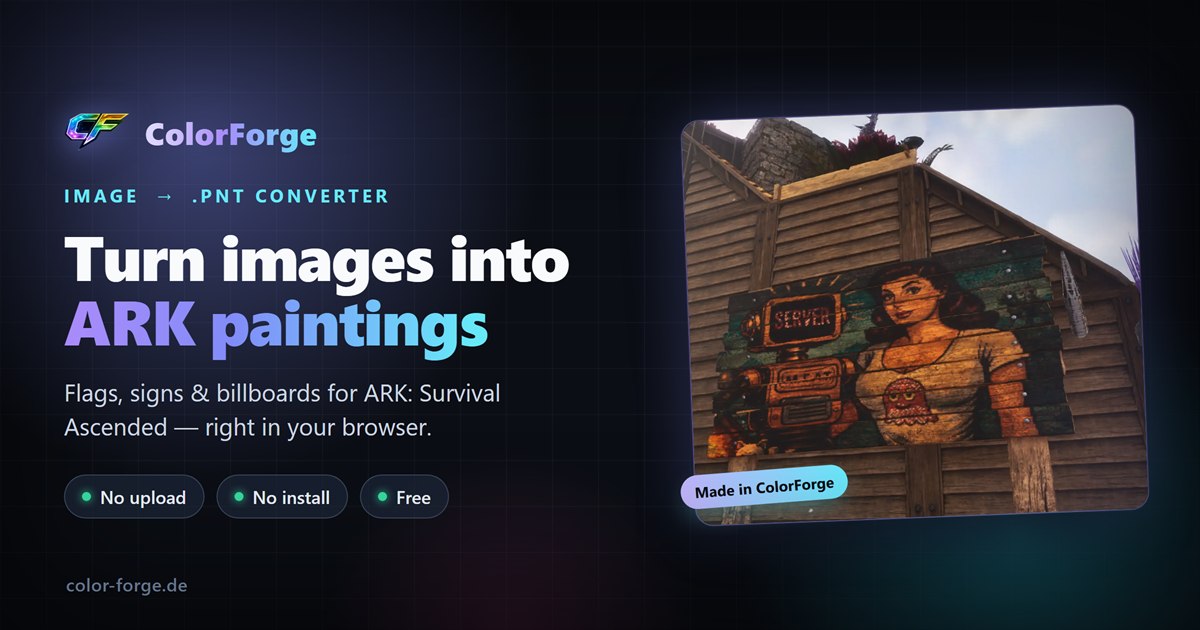
Analyzed the live site → dark theme #0b0e14, the real ColorForge logo, tool screenshots. Built one universal 1200×630 card in the brand look (real logo + screenshot, verbatim copy), plus ready og:/twitter: tags.
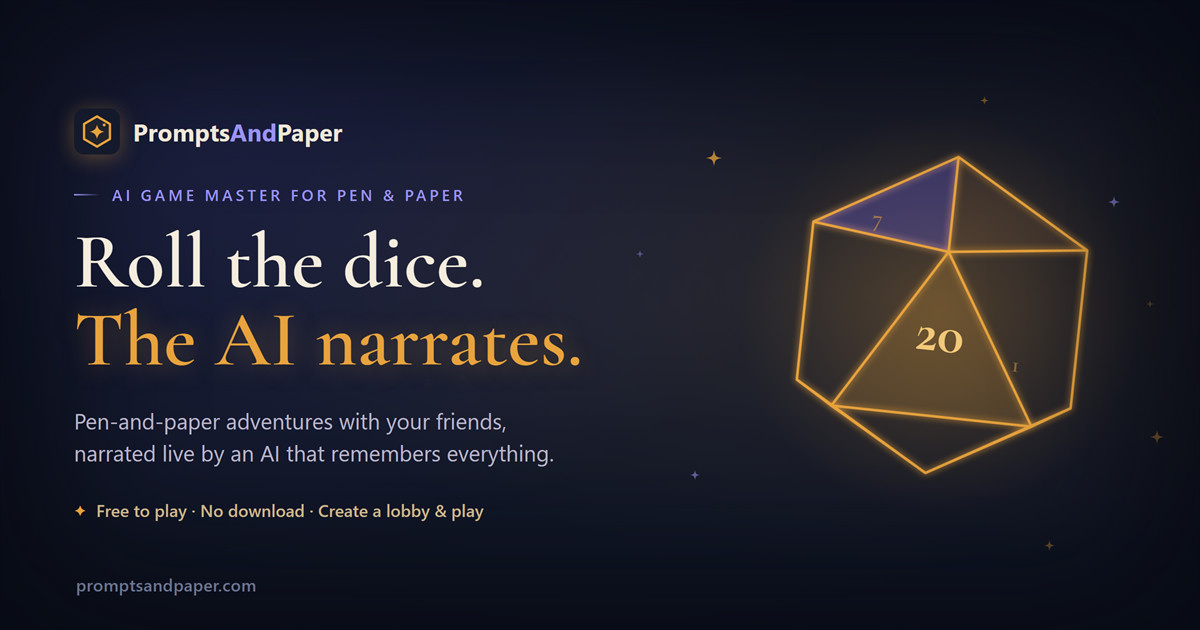
Measured the live design → dark-fantasy #0E1220, gold + Cormorant Garamond, a D20 signature. The old og:image was square (logo only) → replaced with a real 1200×630 card in the site's style, plus corrected meta tags.
Illustrative answers. Results may differ depending on the AI and model.
What it does not do
- Generates nothing before the strategy is approved
- Invents no numbers, ratings, stars or claims the page doesn't support
- No generic AI look when the site already has its own visual language
- Not a general brand designer, SEO all-rounder or context-free image generator
- Doesn't bypass login/hotlink protection on third-party sites; doesn't guarantee a specific platform render (verifies with the official debuggers)
Compatibility & tech
- Tested (internal)
- 4 scenarios
- Recommended runtime
- Claude Opus or Sonnet; with web/shell access for live analysis of the real page
- Modes
- Audit · Create · Optimize · Repair (cache/tags) · Concept-only · Code-only · Reference-images-only · Maintenance
- Inputs
- Website URL · existing HTML / meta tags · brand assets / logo · screenshot / reference
- Output format
- Social preview manifest + preview images (image/SVG/HTML/code) + meta tags + QA report
- Subcategory
- Open Graph & social previews
- License
- Proprietär
Security profile
Runs entirely on your machine with your own AI, no external runtime, no running costs.
Only instructions, templates and references, no executable scripts.
Accesses external sources / the network in normal use (e.g. live pages, search/data APIs).
What you get
- social-preview-architect-1.0.2/11 files
- .claude-plugin/marketplace.json
plugins/social-preview-architect/skills/social-preview-architect/11 files
- SKILL.md
- manifest.json
assets/4 files
- og-card-screenshot.html
- og-card-standard.html
examples/2 files
- colorforge-og.jpg
- promptsandpaper-og.jpg
references/5 files
- social-preview-architect-brand-dna.md
- social-preview-architect-checklist.md
- social-preview-architect-design-qa.md
- social-preview-architect-implementation.md
- social-preview-architect-platforms.md
- .agents/skills/social-preview-architect/→ universal, same content (Codex, Cursor, Copilot, Gemini, Windsurf, Cline)
- LICENSE.txt
Installation
Also works as a chat prompt
No AI tool? Paste it into Claude, ChatGPT or Gemini and use the method right away.
This skill ships no scripts, so the prompt carries its full method.
Works best when your chat has web access.
Installing is the full version. It triggers automatically, runs its scripts and loads references as needed. As a chat prompt you drive the method by hand.
Unlock to copy the ready-to-paste prompt, then in “My Skills”.
Reviews
Note
Best with the URL (or the <head>/HTML) of the real page and your brand assets. Whether the output is a finished image or SVG/HTML/code depends on the AI runtime: the skill automatically picks the best available format and always ships the meta tags. Platform specifics (image sizes, truncation, caching) are a dated snapshot and, with web access, are re-checked against the official docs; a specific platform render is not guaranteed.
Changelog
- v1.0.224.09.2026Maintenance update: follow-up questions now use your platform's native question tool (at most 3 questions, recommended option first, numbered list as fallback, never blocks unattended runs). Plus cleaner typography across all shipped files. Facts, deadlines and platform details rechecked against current official sources (as of September 2026).
- v1.0.107.07.2026Two real reference examples added (ColorForge, PromptsAndPaper): the OG cards generated live with the skill now appear right in the examples and ship as reference images in the package (assets/examples/). Command-style inputs.
- v1.0.007.07.2026Initial release: strategy-before-pixels workflow (manifest + approval), asset-first design from the real brand, universal 1200×630 (1.91:1) standard, capability detection (finished image / SVG / HTML / Next.js opengraph-image.tsx / Satori / spec + prompt), readability QA from 1200 down to 300 px, platform matrix (Discord/Slack/LinkedIn/WhatsApp/X and more) + official debuggers, meta-tag & framework wiring, review/maintenance modes and a Social Preview Profile.
Frequently asked questions
What does Social Preview Architect do?
Social Preview Architect is an AI skill for Open Graph and social-share previews that plans, designs, checks and maintains the images and meta tags your website shows when links are shared on Discord, Slack, LinkedIn, WhatsApp, X and beyond. It never generates blindly: it first inspects the real page (logo, colors, theme, existing og: tags), then proposes a preview strategy for approval.
How do I make Open Graph images for my website?
Social Preview Architect first inspects your real page (logo, colors, theme, existing Open Graph tags), proposes a preview strategy with image count and templates for your approval, then produces the cards at the universal 1200×630 standard (as a finished image, SVG, HTML or framework code depending on your AI runtime), including the matching meta tags.
Why does my link look blank or broken when shared?
Usually the og:image is missing or unreachable, there are multiple or relative image URLs, or the platform is showing a stale cached version. Social Preview Architect checks exactly that, names the cause and gives the concrete fix plus a cache refresh via the official debuggers (Facebook Sharing Debugger, LinkedIn Post Inspector).
What is Social Preview Architect good for, and what not?
Social Preview Architect is for social previews (link previews), analyzing, planning, designing, optimizing and maintaining the share images and meta tags across every platform. It is not a general brand designer or an SEO all-rounder. For a full UI it points you to Frontend Design, for AI visibility/GEO to Web AI Vitals.
Which platforms and image sizes does the skill cover?
Social Preview Architect plans a universal card at 1200×630 (1.91:1) by default, which works robustly on Discord, Slack, LinkedIn, WhatsApp, Facebook, X, Telegram, Teams, Reddit, Threads, Mastodon and iMessage, and recommends platform-specific variants only when they genuinely help.
Does the skill generate images right away?
No, Social Preview Architect deliberately does not generate blindly. It first builds a social preview strategy (what it found, how many images, which templates, which theme) and waits for your approval. Only then does it create the previews, each followed by a readability and brand check.
Which AI tools does Social Preview Architect work with?
Claude · ChatGPT/Codex · Cursor · Copilot · Gemini CLI · Windsurf · Cline
How do I use Social Preview Architect?
Social Preview Architect is a SKILL.md in the open agentskills.io standard: install it with one command (npx) or download it and add it to your AI tool: Claude (Projects), ChatGPT (Skills or Projects), Cursor, Copilot, Gemini CLI and more. No code needed.